We've moved! Please subscribe to the Google Marketing Platform blog for updates


Posted:

Yesterday, we announced a revamped Google Web Designer, brimming with new features that make it even easier for creative designers and developers to build robust HTML5 creative. 


Today, we’d like to introduce you to Marius Veltman, a rich media expert from Holland and a life-long creative technologist. We first met Marius last year when he tested out the alpha version of Google Web Designer and gave us a list of improvements for the product.

For this launch, Marius gave us a peek into his world as an artist and designer and helped us push the limits of HTML5 with a “Google Web Designer Thought Experiment.” We asked him to create an awesome HTML5 ad unit, using only Google Web Designer, that takes advantage of different device form factors and successfully conveys a brand’s message. 

We selected the Google Cultural Institute as the brand and used the Street View imagery from their Great Barrier Reef World Wonders Collection as the assets. We then set out on an adventure through Holland to document Marius’s creative process as he worked to develop the ad.

Watch as Marius’s sketches come to life through the medium of HTML5 and the help of Google Web Designer. Marius's ideas develop in parallel to his own story as a designer. Then, check out the actual ad unit and learn more about his process.


Posted by Becky Chappell, Product Marketing, Google Web Designer
Posted:
Back in May we launched custom Floodlight variables (CFVs) in DoubleClick Search. CFVs allow you to track and report on non-PII user activity associated with conversions. If you use Floodlight tags to track conversions, you can now leverage CFV data in your DoubleClick Search reports.

CFVs can be either metrics or dimensions. Metrics reflect numeric data and dimensions reflect alphanumeric or numeric strings. Let’s say that I represent a bank and created a metric to capture the number of credit card sign ups and a dimension to track different credit card types, such as cc gold, cc silver...etc. With both metric and dimension data in DoubleClick Search I’m able to analyze the number of sign ups for each credit card type and make decisions about how to allocate the bank’s advertising budget.
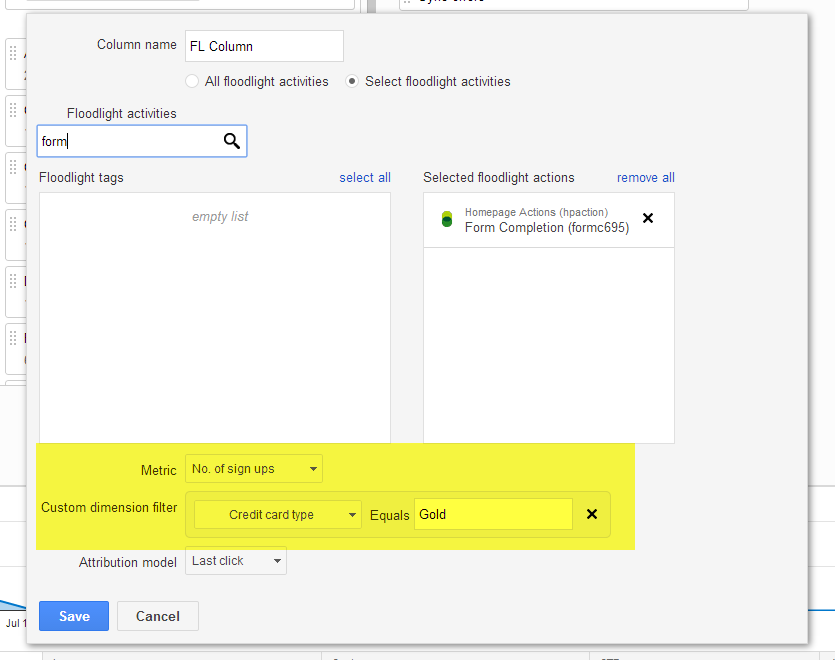
Once CFVs are available in DoubleClick Search you can include CFV metrics in Floodlight columns and/or filter results by CFV dimensions. For example, I may want to see the number of credit card sign ups for a specific Floodlight tag and credit card type, such as “CC Gold”. For more info, please refer to this article.


For views containing Floodlight data, such as Actions, Transactions, or Floodlight columns, you can report on CFV dimensions using segmentation or dimension grouping. For example, I may want to understand how the different credit card types are performing across ad groups within a campaign. Segmenting a report by a CFV dimension will return a row with each ad group and CFV dimension value combination (e.g. one row for ad group #1 and cc gold & one row for ad group #1 and cc silver). If instead I want an aggregated view of CFV dimension data, I can select the CFV dimension from the Dimensions tab. This will return a row with data for each CFV dimension value (e.g. one row for cc gold & one row for cc silver).    


To take advantage of this feature you’ll need to take the following steps:
  1. Create CFVs in DoubleClick Campaign Manager (DCM). More info.
  2. Add the CFVS to the Floodlight tags on your website. More info.
  3. Set up CFVs within the Advertiser Settings section in DS. More info.

We encourage you to give CFVs a whirl and share your feedback and findings with your DS account management team.

Posted:

Almost one year ago, we launched Google Web Designer, a free, easy-to-use, professional-grade HTML5 authoring tool. Over that year, we’ve seen increased adoption of HTML5 and Google Web Designer across the industry.

Fast facts, one year in: 
  • In the first half of 2014, DoubleClick Rich Media ad impressions from HTML5 grew 140% compared to the second half of 2013.
  • Ads built with Google Web Designer have garnered 2.5B impressions since the launch of the product.
  • Over 20% of Google Web Designer’s user base are returning users and 72% are located outside the United States. 
  • We partnered with the IAB to launch the “Make Mobile Work” Initiative, which has reached thousands of people through press outreach, an industry open letter, and quarterly webinar series.
  • Advertisers are seeing performance improvements as a result of adopting HTML5. For example, TalkTalk decreased their eCPA by 12% and reduced their backup image rate by 13% by adding HTML5 to their campaign. 
So what’s launching in Google Web Designer? 
Today’s launch provides more granular control and creative flexibility to creative developers and designers, and allows them to easily build more interactive and animated HTML5 content and get it published quickly.
  • Revamped Events and Components allow designers to make any element interactive, and customize the types of interactivity within their creative. 
  • The updated timeline provides more granular control for designers to easily build animated content. 
  • Tighter integrations with Google Drive, DoubleClick Studio, DoubleClick Campaign Manager and AdWords let users collaborate on their works-in-progress and publish finished units more quickly. This integration marks the first time that AdWords will support HTML5 ads.


Simplifying cross-screen advertising
In addition to Google Web Designer, we are continuing to develop tools to make it easier for advertisers and agencies to build successful cross-screen advertising campaigns. 

We recently launched several features in DoubleClick to help you execute and measure your campaigns across screens, including in-app remarketing and conversion tracking in DoubleClick Campaign Manager. We also launched MRAID 2.0 support in DoubleClick Studio and we have certified 69 large publishers and networks for in-app formats, meaning developers can build mobile in-app ads with the confidence that they’ll be accepted across more publishers and networks. 

Through its integration with Google Web Designer, AdWords now supports HTML5 ad creatives. In addition, Flash ads that are uploaded to Adwords will automatically be converted into HTML5 ads and can be uploaded via AdWords Editor and other 3rd party tools coming soon. Over the next few months, we’ll also be releasing tools and services that will resize ads to some of the most popular mobile sizes, without requiring any additional work on the part of the agencies.

Want to learn more?
  • Creative Agencies:
    • Visit our revamped website and download the product for free. 
    • Register for our Google Web Designer overview webinar on Wednesday Aug. 13th. Our lead Product Manager and Creative Technical Consultant will walk through the new Google Web Designer features and demo some cool creative executions. 
  • Media Agencies:
    • Register for our third webinar in the Make Mobile Work Series, focused on best practices for mobile targeting, on Tuesday, Aug. 12th. Google will be presenting alongside speakers from Millennial and Facebook.

Posted by Sean Kranzberg and Tony Mowatt, Engineering Manager and Lead Product Manager for Google Web Designer

Posted:
When consumers act, they act fast. Retailers can get a leg up in the marketplace by responding to consumers’ needs as they surface. While some events, such as holidays and championship games, can be anticipated, others, such as weather-related issues, cannot. Using real-time technologies in search, brands can dynamically adjust their reach, competitiveness and relevancy with their target audiences at the most critical times.

In a new Think Insights article, Casandra Jones, Account Director at iProspect, tells us the benefits of adopting SEM tools that act in real time to achieve search success as these important events and conversations occur.

Screen Shot 2014-07-20 at 8.40.04 PM.png

Check out Casandra’s article on the Think Insights page here, and let us know what you think on Twitter or our Google+ page.

Posted:
In June, we added the following features to DoubleClick Search (DS):
  • Public launch of Yahoo! JAPAN accounts in DS
    We’re excited to announce the full launch of support for Yahoo! JAPAN campaigns in DS. You can create, manage, report on, and optimize Yahoo! JAPAN search campaigns in DS. To get started, you’ll first need to create a DS engine account for a Yahoo! JAPAN Listing Ads account. Once that’s set up, you can create and manage your campaigns under the account.
  • Report on AdWords estimated conversions
    Estimated conversions is an AdWords feature that provides a holistic view of all conversions driven by your Google search advertising. This includes conversions starting on one device or browser and completing on another, or that start online and finish with a phone call. (The feature requires you to enable AdWords conversion tracking in your AdWords account.) You can now include the number of estimated total conversions and cross-device conversions in your DS reports. Learn more.
  • Executive Reporting: new web-view mode
    You can now view executive reports online via a web-view mode without needing to download them. Learn more.

We also made the following feature updates:
  • New options for segmenting reports
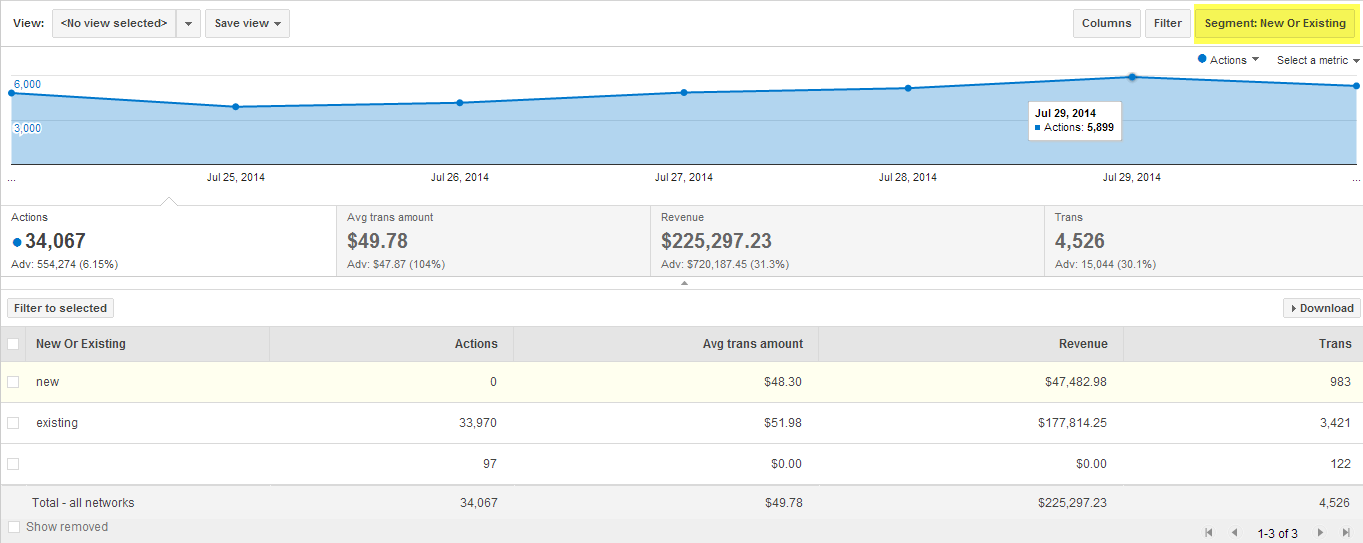
    DS now supports several new report segmentation options, such as segmenting reports on labels and applying date segments to the reports that you view in DS and that you download. In addition, in most reports you can now specify multiple segments, such as Floodlight activity and device. Learn more.
  • Updated time-range options for reporting tables
    DS now supports new time-range options in reports, such as including data from the current day, selecting the start day for weekly ranges, and selecting your own custom range, such as the last 15 days or the 37 days. Learn more.
  • Shopping campaigns: Use the Dimensions tab instead of the Products tab
    To analyze Shopping campaign performance based on product attributes, such as Category and Brand, you now use the Dimensions tab instead of the Products tab. Learn more.
  • New authorization process for Bing Ads accounts
    Bing Ads is changing its sign-in process from username-password authentication to Microsoft Account authentication and authorization. If you’re changing the settings of an existing Bing Ads engine account in DS, you'll need to follow the new authorization process before you can save your changes. You do not need to update engine accounts yet if you aren’t making other changes. Learn more.
  • "Campaign target network" is now required when creating AdWords campaigns via bulksheet The "Campaign target network" column in a bulksheet specifies the advertising network (search, display, partner, and so on) that an AdWords campaign targets. Previously this column was optional, but as part of supporting the new AdWords “Search Network with Display Select” campaigns, DS now requires you to specify a value for AdWords campaigns. For details, download the "Campaign" or "All" upload template (XLSX format) and rest the mouse pointer on the "Campaign target network" column heading.


Watch the recorded webinar for June features to see these updates in action.

Posted by the DoubleClick Search team