We've moved! Please subscribe to the Google Marketing Platform blog for updates


Posted:
(cross posted from the DoubleClick Search blog. To learn more about DoubleClick Search, contact your Account Manager or request a call from a DoubleClick Search specialist.)

We heard from several of you about the importance of improving the process of downloading reports and uploading files in DoubleClick Search V3 (DS3). You offered comments and suggestions for making the functionality better. As a result, the DoubleClick Search team spent the past few weeks prioritizing and focusing on the changes that would provide the biggest impact. We hope that the improvements described below will make a major difference in your use of DS3.

Faster upload processing of large accounts

Our Engineering team made several changes behind the scenes to improve the upload processing times of large engine accounts (engine accounts with over 100,000 keywords). In the past, uploads of large accounts took a much longer time to process. Now, these previously delayed uploads will process at least 20 times faster per row.

Uploaded keywords now include dashes (-) and periods (.)

Before this release, DS3 would remove all dashes (-) and periods (.) from uploaded keywords. You can now upload keywords with the confidence that they will remain intact.

Downloaded reports now include AdWords broad match modifier (+)

Before this release, DS3 would remove the Google AdWords broad match modifier (+) from downloaded reports. The downloads now include the modifier, and it will also remain if you need to make changes to the report and upload it back into DS3.

We’ll continue to look for new ways to make the download and upload processes better in the future. Please contact your Technical Account Manager or email ds-support@google.com with any suggestions.

For more information about other new features in this DS3 release, including new bid strategy reporting columns, check out the release notes. And keep an eye on the blog for more exciting features in upcoming releases.

Posted by the DoubleClick Search team
Posted:

In 2009, we launched the DoubleClick Ad Exchange as a way to simplify the process of buying and selling display advertising, drive performance for our advertiser and publisher partners, and open up the display marketplace. In the two years since, exchange-based trading has taken off -- we’ve seen the volume of trades on our own exchange grow by more than 150% in the past year. At the same time, display, as a medium, has evolved.

Display started as just banner ads on websites, but has grown to include a range of formats as diverse as the web itself -- rich media ads that bring a page to life, in-stream ads that play before your favorite online video, and ads that run in the mobile version of your daily newspaper. To reflect this growing diversity, we have been expanding the types of formats in the Exchange. We support the most popular types of rich media ads, including units that run in-page with video, or expand when you click or mouse over them. It’s also possible to buy ads across the mobile web. Earlier this year, we announced that in-stream video formats were coming to the Exchange, and we’ve seen huge demand since launch: the number of buyers for in-stream video has tripled over the past quarter.

Today, we are announcing another step forward -- in the coming weeks, AdMob developers will be able to make their in-app inventory available on the DoubleClick Ad Exchange. Initially, a small number of pre-qualified buyers will be able to compete for this inventory. Over time, we'll be rolling it out more broadly. Ultimately, this will give app developers and publishers access to a wider pool of buyers like demand-side platforms and agency trading desks, improving their potential returns, and helping grow the overall mobile web economy. And marketers on our Exchange will be able to buy, in real time, ads that run inside people’s favorite mobile games, news apps and more. With this important addition, the DoubleClick Ad Exchange will be truly cross-format...and will become the first exchange to support this full range of ad formats.

VivaKi, one of our key partners on the Exchange, is gearing up to start buying in-app ads on the Exchange. “We are delighted to be working with Google as they open up the DoubleClick Ad Exchange to include AdMob in-app inventory, and to deliver this opportunity to our clients,” says Kurt Unkel, Senior Vice President, VivaKi Nerve Center. “We anticipate this experience will help us bring mobile to scale to our partners, and will provide insight into the operational elements and the creative assets that work best in this environment.”

A cross-format exchange is just one of the ways we’re looking to simplify the process of buying and selling display advertising, but one we think will create tremendous value for advertisers and publishers. We will continue to work with our partners to help them get the most out of what the evolving display market has to offer -- today, tomorrow, and in the years ahead.

Posted:

One benefit of DoubleClick Ad Exchange is that buyers can bring their own data, optimization and bidding strategies to the exchange in order to meet their own goals. In a new case study with Quantcast, we look at how they do exactly these things in real-time and at scale through their product, Quantcast Lookalikes.

Data and scale are two things Quantcast embraces. For example, across DoubleClick Ad Exchange, Quantcast achieves an amazing callout rate close to 100%, which means they can respond to almost all of the impressions DoubleClick announces to them. This matters in RTB because the best impressions for a campaign become easier to pick when the buying system sees them all. And since the start of 2011, Quantcast has doubled the number of impressions it handles from DoubleClick Ad Exchange and its overall data processing capability grows rapidly. Quantcast’s system currently generates a live feed of 400,000+ events a second, adding up to over five petabytes (five million gigabytes) of data processed a day with an incredibly high frequency of data points.

Quantcast especially appreciates DoubleClick Ad Exchange as a source of real-time inventory.

As Crispin Flowerday, Real-time Platform Manager at Quantcast says, "Quantcast helps advertisers and publishers get the right impression to the right person at the right time, so we seized on DoubleClick Ad Exchange's real-time bidding API as soon as it was available to us in 2009. RTB is a key pillar of our efforts to make advertising relevant and audiences valuable and the DoubleClick Ad Exchange is helping us make that dream a reality."

For more details on how Quantcast Lookalikes are used on the DoubleClick Ad Exchange, download the full case study here.

Posted:
(cross posted from the DoubleClick Search blog. To learn more about DoubleClick Search, contact your Account Manager or request a call from a DoubleClick Search specialist.)

We recently described some new DoubleClick Search V3 (DS3) features designed to improve your workflow and productivity. Now, we have even more improvements to enhance your reporting and upload capabilities.

Inferred match type

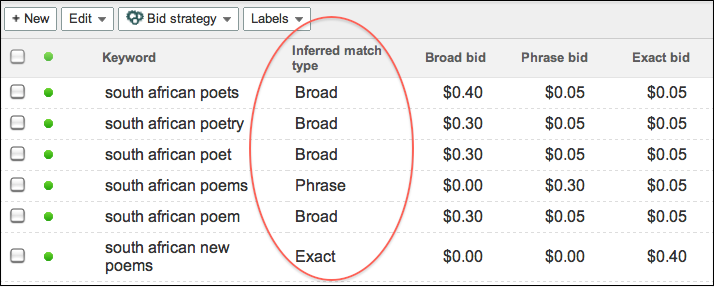
When we launched DS3, we provided the ability to set a bid for each match type on a Microsoft adCenter keyword. As each keyword could correspond to three match types and we couldn’t determine with certainty which match type caused the conversion, we were unable to populate the Match type column in reporting. However, many of you duplicated keywords to have a 1-to-1 match type relationship and asked us to display match type. As a result, the new Inferred match type column allows you to see a match type attributed to your adCenter keywords and makes it easier to compare keywords across engines.


DS3 infers the match type from the bids you have set for adCenter keywords:
  • - If a broad match bid is set (in other words, greater than 0), DS3 assumes it’s a broad match keyword.
  • - If a phrase match bid is set but not broad, DS3 assumes it's a phrase match keyword.
  • - If an exact match bid is set but not phrase or broad, DS3 assumes it's an exact match keyword.
  • - If a content match bid is the only bid set, DS3 will leave the Inferred match typecolumn blank.
After you select the Inferred match type column, you'll be able to see it in DS3 reporting on the UI and on downloaded reports. A few other things to keep in mind:
  • - To make it easier to compare keywords across engines, DS3 will copy the Match type column value into the Inferred match type column for Google AdWords and Yahoo! Search Marketing keywords.
  • - This is a read-only column: You won’t be able to update match type by changing the value in the Inferred match type column and uploading.
  • - This column does not appear in DoubleClick for Advertisers (DFA) reporting. You won’t be able to see a match type for adCenter keywords in DFA.

Upload email confirmations

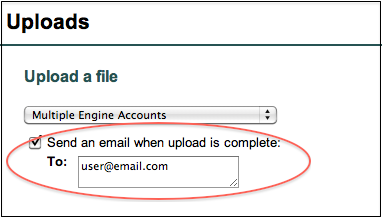
Tired of constantly checking the Uploads list to see if the spinny has stopped and your important upload processed? You can now opt to receive emails when an upload is complete. The email will contain a link to the upload page; if there are errors, you can download the error sheet from the uploads list, make corrections, and attempt the upload again.


Names for emailed reports

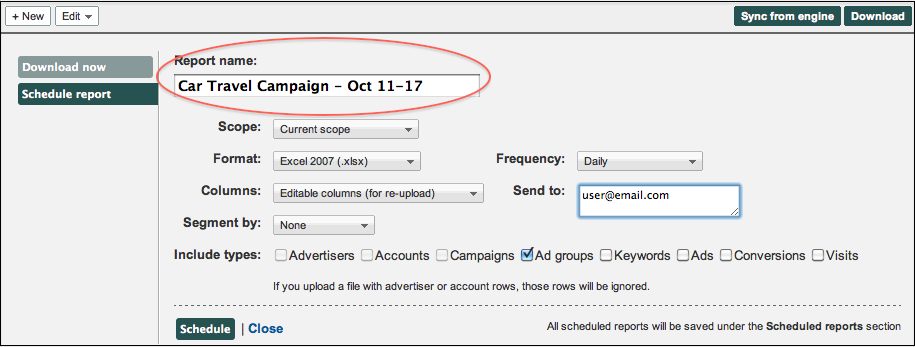
When you set up a report to be emailed from DS3, you can now customize the name that will appear in the email subject line. This is useful if the default name isn’t descriptive enough to differentiate between reports. For example, you could email two reports for the same campaign, but set up different date ranges, and include the date ranges in the report names.


To make sure you learn about new DS3 features as they’re released, enter your email address in the Follow by Email field in the upper righthand corner of the blog and click Submit. You’ll receive an email every time we add a post to the blog.

Posted by the DoubleClick Search Team

Posted:
(cross posted from the DoubleClick Search blog. To learn more about DoubleClick Search, contact your Account Manager or request a call from a DoubleClick Search specialist.)

In addition to Floodlight segmentation, we’ve made some exciting enhancements to the DS3 UI over the past few weeks, including new filter options, keyword defaults, and a settings bar for campaigns and ad groups. Read on to learn how these new features can help you work faster and better in DS3.

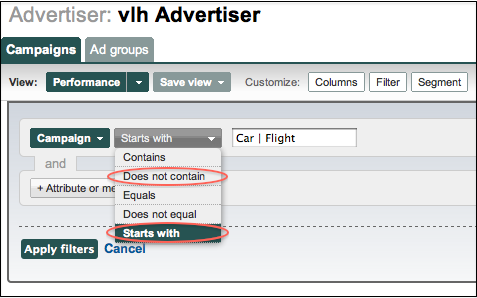
New filter options: ‘Does not contain’ and ‘Starts with’

When you set up a filter that has the options Contains, Equals, and Does not equal, there are now two additional options: Does not contain and Starts with. When combined with the recently released ability to filter by multiple terms, you have an even more powerful set of filtering options.


Apply default settings to keywords

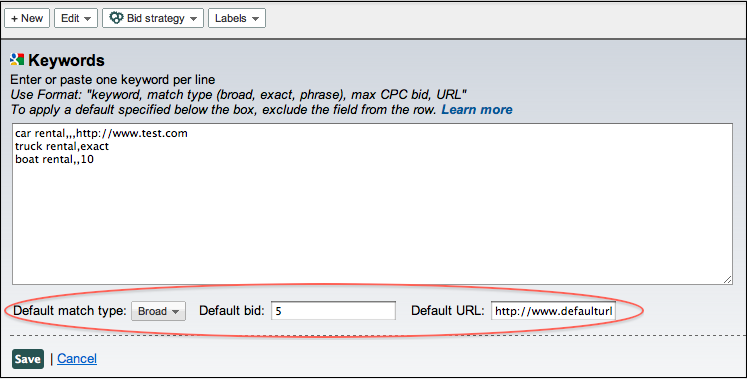
When creating keywords in the DS3 UI, you can now apply default values to keywords as you enter them in the text box. This makes it easy to apply the same values to several keywords, while also customizing the settings for some keywords when needed.

For example, if one keyword in an ad group is performing well, you can set a specific max CPC bid of $10, while keeping all other keywords at the default bid of $5. To apply a default, exclude the field from the row in the text box. Learn more about the proper formatting of default keyword settings in the Help Center.


New settings bar for campaigns and ad groups

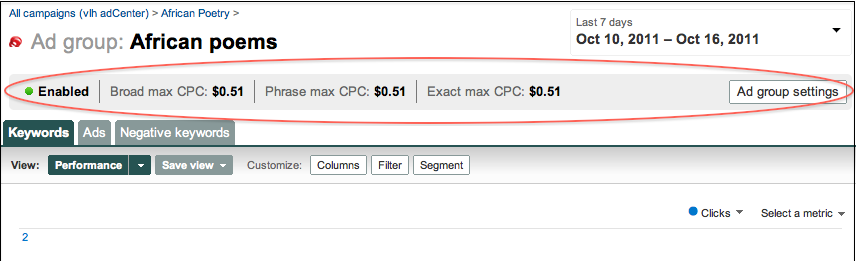
When you select a campaign or ad group in DS3, you’ll now see a settings bar near the top of the page. This bar gives you a quick overview of campaign/ad group settings. If you need to make a change, you can simply click the Campaign settings or Ad group settings button and edit the settings in the inline panel that appears. Look for even more useful information in this bar in the future.


For more information about the latest DS3 release, including fixes to known issues, check out the release notes. And keep an eye on the blog for information about improvements to uploads, downloads, and reporting!

Posted by the DoubleClick Search Team